Swa vs ChatGPT Dots: One Model, One Owner, One Seat
OpenAI introduced dots on September 29, 2026, and described them as “remarkably capable, always-on agents built to handle everything.” After reading OpenAI’s own documentation, we agree with the first half of that. Dots are a serious piece of engineering.
They are also built around a single person. One model, one owner, one seat. That is a reasonable design for a personal assistant and a harder fit for a company, and the difference is easy to miss in a demo. This is what the documentation says, as of October 29, 2026. Dots are rolling out gradually, and OpenAI is shipping changes weekly, so check the current pages before you decide.
The short version. Dots are a serious personal agent: one model, one owner, one seat. In Slack only the owner can direct a dot, and OpenAI sells a separate product, @ChatGPT, for shared team use, with its own setup and no memory at launch. Swa is one assistant for both jobs. Anyone in the thread can ask it, you pick the model or let it route, and there are no per-user fees.
What dots do well
Each dot is an always-on agent that “lives in the cloud and has its own computer and browser.” It keeps working when your own computer is off. It can research, analyze data, prepare documents and build software, use background agents to work on several things at once, and delegate to ChatGPT Work or Codex. You can message it or call it in ChatGPT, and you can schedule recurring work or ask it to act when a specific event happens in a connected service. OpenAI says a dot can connect to more than 4,000 apps through its plugin ecosystem.
The safety design is thoughtful too. An automatic review checks actions before they run and decides whether to proceed, ask for approval, or hand a step back to you. Credentials are entered in a private form rather than typed into the conversation. OpenAI’s documentation says conversations with a dot do not count toward your ChatGPT usage limits, while tasks it starts in Work or Codex do. A release note adds that this holds “for the next month” from launch, with usage terms for each plan to follow.
OpenAI is also moving quickly. An October 9 update added creating a dot from the ChatGPT mobile app and better handoff between dots and Codex. If your team already lives in ChatGPT and Codex, that continuity is a real advantage.
One model
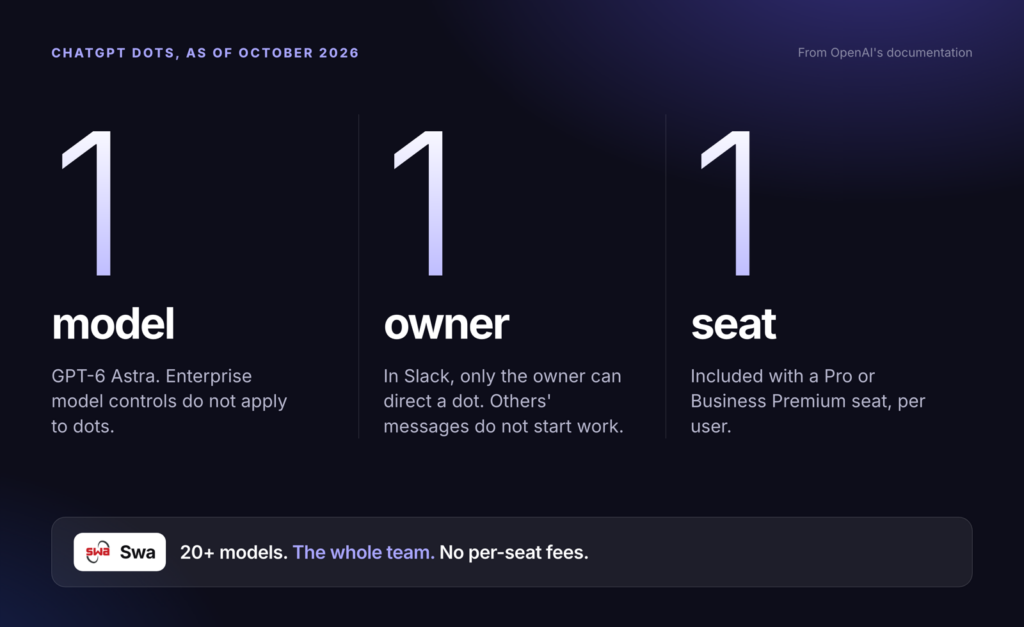
OpenAI’s documentation says dots are powered by GPT-6 Astra. The pages we read describe no way to choose a different one for a task, and the administrator guide states plainly that “Enterprise model controls and defaults do not apply to the main dot.”
That matters because different work suits different models, and models improve at different rates. Swa routes across 20+ models, including GPT-6 Astra. You can pick the model you want for a task, and if you don’t, Swa routes it to the best one automatically. Administrators can switch Swa on or off for individual people and teams, and control which models are available at the organization level or for a single person.
Choice and coverage at a glance
Dots: from OpenAI's documentation. The shared assistant, @ChatGPT, is a separate product.
One owner
This is the difference we think matters most for a team. In Slack, OpenAI’s guide says a dot “responds to you” by default, and the administrator FAQ is more direct: “Only the owner can direct their dot through a Slack direct message or supported channel mention. Messages from other people do not start work.”
So a dot can sit in a channel, but it takes instructions from one person. The rest of the team can read what it posts, and the owner can tell it to engage with others, but other people’s messages do not start work. The dot can also message its owner privately to ask what they are comfortable sharing before it replies in a channel. OpenAI’s own pages describe this in two ways, so we have quoted both.
OpenAI does have a shared assistant for teams. It is a separate product called @ChatGPT. OpenAI’s DevDay recap says teammates can use it “without needing an individual ChatGPT license,” and that it is available to all Business and Enterprise plans. Its help article adds that an administrator configures it, that in Slack it has to be added to the channel, and that people can make requests without connecting their own ChatGPT account unless their administrator requires it. It also needs workspace credits, has a per-agent spend cap, does not respond to Slack guests and is not supported in Slack Connect channels. But it is not a dot. OpenAI’s help article says: “At launch, @ChatGPT does not record or access memory,” and that it does not automatically inherit your access to files, apps or private channels. In other words, OpenAI’s personal agent and its shared assistant are two products with separate memory, separate setup and different plans.
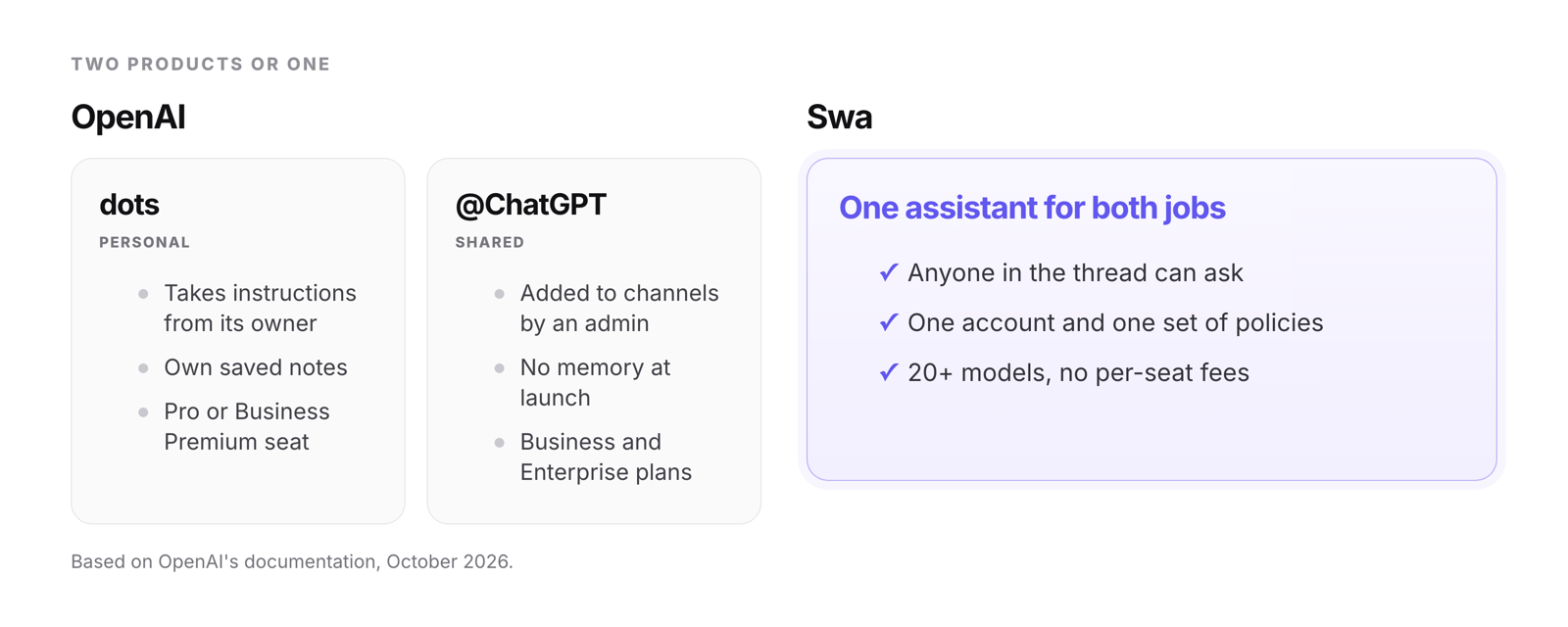
Swa is one assistant for both jobs. It is a shared teammate: anyone in the thread can ask Swa directly, in Slack, Microsoft Teams, WhatsApp, SMS or on the web, with one account and one set of policies behind it.
One seat
A dot is included with a ChatGPT Pro plan or a Business Premium seat. OpenAI lists Business Premium at $125 per user per month, or $100 per user per month billed annually, against $25 or $20 for a Standard seat. Dots are not available on Free or Plus. On Enterprise they are off by default until a workspace administrator turns them on. Pro plans ($100, $200 or $500 a month) are for people aged 18 and older outside the European Economic Area, the UK and Switzerland. Business Premium is rolling out worldwide. Each person who wants a dot needs the plan that includes it.
Swa has no per-seat fees. Adding a person does not add a line item, and the cost scales with usage.
Where it is still early
Where you can reach it
Ways to reach each one, from OpenAI's documentation and Swa's own site. Swa answers in the thread, for anyone in it.
This is OpenAI’s own account of what is not finished yet:
- OpenAI’s pages disagree about Microsoft Teams for dots. One administrator guide says access is “limited to an invite-only alpha,” while the Help Center’s admin article now lists adding dots to Microsoft Teams “where available.” We found no page announcing Teams for dots as generally available. Slack is the channel that the setup steps actually walk through. The separate @ChatGPT assistant does support Teams.
- OpenAI’s launch post said texting was coming soon. On October 28 its release notes said texting your dot is starting to roll out in beta to Pro users in the U.S., through iMessage or RCS and a third-party messaging provider, while its Help Center describes a limited beta for Pro users in the US, through a third-party provider, that is not available in Business or Enterprise. For Enterprise it says phone messaging through iMessage, RCS or WhatsApp is unavailable at launch.
- Calls started by the dot, as opposed to calls you start, are “planned for after launch.”
- You can now create a dot in the ChatGPT mobile app as well as the desktop app or a desktop browser, though OpenAI’s launch post and release note still say desktop only, mobile web is not supported, and connecting Slack or texting still has to be done from desktop.
- A dot has no email address of its own at launch, so inbox work means connecting your own email. Adding a dot to a Slack channel does not make it watch that channel. You tell it what to monitor.
- On Enterprise, Slack needs three parties: a ChatGPT workspace owner who enables the dots permissions, a Slack owner or app manager who installs the ChatGPT app, and each member connecting their own dot.
- Each person starts with one dot. OpenAI says “In the future, you’ll be able to add more dots,” and that it envisions “teams of dots working together,” which means several dots working for one person, not one dot shared by a team. It has also previewed “specialist dots” with their own identity for focused enterprise pilots. Those are not available today.
Swa is live today in Slack, Microsoft Teams, WhatsApp, SMS, the web, iPhone and Android, all on the same account.
Side by side
| Capability | ChatGPT dots | Swa |
|---|---|---|
| Who it serves | One owner. Messages from others in Slack do not start work. | The whole team. Anyone in the thread can ask. |
| Model | GPT-6 Astra. Enterprise model controls do not apply. | 20+ models including GPT-6 Astra. Pick one, or Swa routes automatically. |
| Slack | DM or channel mention, responds to its owner by default | Ask in the thread |
| Shared team assistant | A separate product, @ChatGPT, with no memory at launch and separate setup | The same assistant, one account and one set of policies |
| Microsoft Teams | Dots: OpenAI’s pages disagree. The admin guide says invite-only alpha. | Live |
| WhatsApp and SMS | Texting: limited beta for US Pro users. Enterprise: iMessage, RCS and WhatsApp unavailable at launch. | Live |
| Pricing | Included with a Pro or Business Premium seat, per user | No per-seat fees, usage-based |
| Browser automation | Yes, on the dot’s own cloud computer | Yes |
| Voice | Yes, you can call your dot and talk it through | Speak your questions by voice. No live calls. |
| Scheduled work | Yes, plus event-triggered tasks | Scheduled automations written in plain English |
| Administration | Off by default on Enterprise. Admins grant access, Slack participation and local-computer access. | One admin portal: switch Swa on or off per person or team, set models at org or personal level, usage and budgets |
Live voice calls are a row that favors dots, and we have left it in on purpose. A dot also gets its own persistent cloud computer, which is a real design choice. Both products can drive a browser, so the difference between them is mostly who the assistant works for and which models it can use.
When dots are the right call
- Your team already pays for ChatGPT Pro or Business Premium, so the cost is already absorbed.
- You want a personal assistant for each person, with its own computer, rather than a shared teammate.
- Most of the work is long-running research, documents and code that flows through ChatGPT Work and Codex.
- You are comfortable with one model doing all of it.
When Swa is the right call
- You want one assistant that serves the whole team, instead of a personal agent for each person plus a separate shared assistant with its own setup.
- You want to pick the model when it matters, have the rest routed automatically, and keep up as models change.
- Your team is in Teams, WhatsApp or SMS as well as Slack and you want one assistant across all of them.
- You would rather not buy a premium seat for every person who might use it.
If that sounds like your team, get started free.
Which sounds like you?
Four questions to ask before you commit
1. Who can give this assistant instructions? If the answer is one person, decide whether that matches how your team works.
2. Which model is doing the work, and can we change it? A single model is a bet that it stays the best one for everything you need.
3. Is the personal assistant and the shared one the same product? If they are separate, ask where memory lives and who administers each.
4. What does it cost when twenty people want one? Per-seat pricing is easy to approve for three people and harder at thirty.
Where this leaves things
Dots are a strong first release from a company with a lot of reach. OpenAI says it expects teams of dots over time, and a product this new will change quickly. We checked OpenAI’s pages on October 29, 2026, and its Help Center was being edited while we did. OpenAI also said usage terms for each plan would follow the launch month, so check the current terms before you decide. We will update this comparison as it does.
The question we think matters is not which agent is cleverer. It is whether you are buying an assistant for a person or a teammate for a company.
Frequently asked questions
Can a team use ChatGPT dots?
A dot is built around one owner. In Slack, OpenAI's administrator FAQ says only the owner can direct their dot, and messages from other people do not start work. OpenAI sells a separate product, @ChatGPT, for shared team use. Swa is one assistant that anyone in the thread can ask.
Which model do ChatGPT dots use?
OpenAI's documentation says dots are powered by GPT-6 Astra, and its administrator guide says Enterprise model controls and defaults do not apply to the main dot. Swa lets you pick a model or routes automatically across 20+ models, including GPT-6 Astra.
How much do ChatGPT dots cost?
Dots are included with a ChatGPT Pro plan ($100, $200 or $500 a month) or a Business Premium seat ($125 a month, or $100 a month billed annually), and are not available on Free or Plus. OpenAI said usage terms for each plan would follow the launch month. Swa has no per-user fees.
Do dots work in Microsoft Teams, WhatsApp or SMS?
OpenAI's pages disagree about Microsoft Teams for dots, with one guide calling it an invite-only alpha. Texting began rolling out in beta to Pro users in the US on October 28, through iMessage or RCS, and iMessage, RCS and WhatsApp are unavailable for Enterprise at launch. Swa is live in Slack, Microsoft Teams, WhatsApp and SMS.
What is the difference between dots and @ChatGPT?
Dots are personal agents with their own computer. @ChatGPT is a separate shared assistant that an administrator configures, with no memory at launch. They have separate setup, memory and plans. Swa is one assistant for both personal and shared work.
Try it with your team
Try Swa on a real task in your own Slack or Teams. See the difference in ten minutes.
Keep reading: how Swa agents work, the integrations, or our other comparisons.