Category: AI Insights

AI industry trends, model comparisons, and thought leadership

  • Swa vs Grok Bot: A Serious AI Agent You Don’t Get to Point at the Right Model

    Swa vs Grok Bot: A Serious AI Agent You Don’t Get to Point at the Right Model

    If your team is looking at Grok Bot, the AI agent xAI has been talking up all year, here’s something worth settling before you hand it real work: you don’t get to choose which model does that work.

    Despite the name, Grok Bot doesn’t promise you’re talking to Grok. There’s no model picker, the serving mix can change without notice, and the one admin control that exists ships with a warning that it may not be enforced. We’ll get to the exact wording, because the documentation is unusually blunt about it.

    That’s one of several things worth understanding before you commit. xAI has shipped three separate products this year that all carry the Grok name and all claim to bring AI into how your team works. They don’t share a bill, a setup flow, or a memory. Understanding which one does what, and what any of them actually costs, takes more digging than it should.

    We did that digging. Here’s what we found, and where each product genuinely holds up.

    What Grok Bot actually is

    Setting the fragmentation aside for a moment, Grok Bot itself is a serious piece of engineering.

    Each Bot runs on a persistent cloud computer with its own browser, filesystem, and terminal. You create a Bot, give it a job and a name, and message it the way you’d hand work to a coworker. The Bot works through multi-step tasks across apps and websites, including sites without clean APIs, using a real browser the same way a person would. Work keeps running after you close your laptop, and when a Bot needs a decision only you can make, it comes back and asks.

    Multiple Bots can run in parallel on the same account, coordinating with each other, sharing context, and handing off work without you acting as the router between them. Show a Bot a workflow once, and it can save it as a routine and run it again on a schedule.

    The security architecture holds up to scrutiny too. Anysphere, the company behind Cursor, holds ISO/IEC 27001 and ISO/IEC 42001 certification, issued by Schellman, and Grok Bot is included in the current ISO scope. There’s a SOC 2 Type II attestation alongside them. Enterprise customers get real audit logs, network egress controls with a destination allowlist, SAML SSO through Okta or Entra, and a layered approval system where risky actions pause for a human decision before they run. Early customers include Legora, Supermicro, and ServiceTitan.

    None of that is beta-quality hand-waving. It’s a genuinely different shape for an AI agent, and it’s worth taking seriously.

    Where Grok Bot gets complicated

    Here’s where it gets harder to recommend for most teams.

    Two doors into the same product, and they don’t meet in the middle

    There is no standalone Grok Bot SKU. You get it one of two ways. Through Cursor, at $20/month for Cursor Pro or $40 per seat for a Cursor Teams plan. Or through xAI directly, at $30/month for SuperGrok, with SuperGrok Plus, SuperGrok Heavy and X Premium+ also carrying access. Cursor describes the xAI route as a usage grant rather than a Cursor plan, so paying xAI leaves you owing Cursor nothing.

    Two doors into the same product, priced differently, sold by two companies, and neither company’s page tells you which one you’re supposed to walk through. For an engineering team already inside Cursor, the bundling is free upside. For a sales, marketing, ops, or legal team, it’s a procurement question with no obvious answer.

    Three products, three relationships, no shared memory

    Grok Bot isn’t xAI’s only play here, and it isn’t even the first. In December 2025, xAI shipped Grok Business and Grok Enterprise, a straightforward per-seat chat assistant priced at $30 per user per month for Business, with Enterprise pricing available after a sales call. Separately, there’s Grok for Slack, a channel and DM bot you install into your workspace and then connect to your own xAI API key from console.x.ai, billed for usage on that key rather than bundled into any plan.

    Three products, and here is the part that makes it strange: they are all the same company. SpaceX acquired xAI in February 2026, rebranded it SpaceXAI in July, and closed its $60 billion acquisition of Anysphere, the company behind Cursor, on August 14. Cursor, Grok, and X now sit under one corporate roof. Yet none of these products share memory, identity, or a bill. A Bot you build inside Grok Bot has no idea what your team asked the Slack app yesterday, and neither product knows what the other costs you.

    It doesn’t live inside Slack, it visits

    This is worth being precise about, because it’s easy to get wrong in either direction. Grok Bot is not absent from Slack. A Bot can search Slack and act on what it finds there as part of a task, the same way it can read Gmail or pull a file from Google Drive.

    What Grok Bot doesn’t do is live inside Slack as a presence your team can mention in a channel. You reach it through a separate desktop app (macOS, Windows, or Linux) or the iOS companion app, sign in with whichever plan carries your access, and message a named Bot directly. Slack is a place the Bot can go, not a place it lives. If your team’s instinct is to type @something in the channel where the work is already happening, that instinct doesn’t work here.

    You don’t choose the model, and neither does xAI, exactly

    Despite the name, Grok Bot doesn’t guarantee you’re talking to Grok. Cursor’s own security documentation states it plainly: model selection is Cursor’s call, there’s no customer-facing model picker, and “the serving mix can change over time with no fixed vendor set guaranteed.” An enterprise model allowlist exists, but Cursor’s own onboarding flags that enforcement isn’t guaranteed either.

    In practice, that means you don’t get to route a writing task to one model and a code review to another. You can see which model served a request afterward, since usage analytics record it and billing follows it. What you cannot do is decide in advance.

    All your Bots share one computer

    xAI’s enterprise page says each Bot “runs on its own computer in the cloud.” The documentation says something narrower, under a heading that reads “One computer, shared by all your Bots.” Every Bot on your account uses the same machine, where “browser cookies and signed-in sessions are shared,” “files are visible to every Bot,” and “command-line credentials are shared.” Each Bot gets its own screen, but the docs are explicit that these “are separate work surfaces, not separate security boundaries.”

    In practice that means signing one Bot into Salesforce hands that session to every other Bot on the account. The isolation boundary is the person, not the job.

    There’s a related gap in the audit trail. Action Recording, the log of what a Bot actually did, is off by default, and those events don’t appear in the dashboard’s Audit Logs at all. Getting them anywhere useful means configuring OpenTelemetry export to your own collector. Audit logs are Enterprise-only to begin with, so self-serve Teams customers don’t get that record at all.

    Memory you can’t inspect, and no way to bring it with you

    A Bot’s memory, files, and browser sessions persist across sessions on its cloud computer, which is part of what makes it feel like a real teammate over time. As of September 2026, the documentation describes no self-serve way to inspect what a Bot remembers, correct something it got wrong, or export that memory if you want to move it elsewhere. Deletion happens through a formal data processing agreement after your account ends, not a button you click. And the documentation is explicit that self-hosting is not supported today. The computer is Cursor-managed, full stop.

    Where Swa is built differently

    We built Swa around a different bet: one AI identity, everywhere your team already works, routed to whichever model actually fits the task, with memory you can see.

    One product, every surface, no separate subscription required

    Swa runs natively on Slack, Microsoft Teams, WhatsApp, SMS, and the web from a single @swa mention, all on one account, all sharing the same memory. There’s no separate app to install for Slack presence, no second subscription to buy first, no linked-account workaround. If your team lives in Slack, @swa is already there. If they move to WhatsApp on their phone, the same context follows them.

    This is the difference that isn’t a feature gap. A model picker is something any vendor can ship in a quarter. Being present as an identity inside the tools your team already has open is an architectural decision made at the start. Grok Bot is a desktop application you open, so Slack is somewhere a Bot can be sent, not somewhere it lives. That is not an oversight on their part, it is the shape of the product.

    Every model, including Grok itself, from one interface

    Swa routes across 20+ models, including ChatGPT, Claude, Gemini, Perplexity, Grok, Deepseek, and Llama. Grok is one of the models your team can route a task to directly. Our intelligent routing picks the best model for the job automatically, or your team can specify one by name. Nobody is stuck wondering which model actually answered, because you choose, and you can see it.

    Real browser automation and deep async research, not bolted on

    Grok Bot’s browser-driven task execution is a real strength, and we built the same category of capability into Swa. Swa can drive a browser to complete tasks on sites that don’t have clean APIs, alongside its native integrations, the same way a person would, and it can run deep, multi-step research jobs that take longer than a single reply, working in the background and returning a full report when it’s done rather than making you wait on a spinner. Ask for a “deep dive” or a “full report” and Swa escalates automatically to the tier built for that.

    Credentials Swa never holds

    The flip side of any agent that signs into your tools is where those credentials end up. Swa’s answer is that it doesn’t hold them. Identity is delegated to Auth0, and Swa never sees or stores your credentials or payment information. Data handling is zero-retention, and every query and action is written to an audit trail your admins can read and export, on every plan rather than as an enterprise upgrade. When the question in a security review is “what did the AI do, and with whose access,” that is a question you can answer the same afternoon it is asked.

    Agents that work on autopilot, already shipping

    Swa agents can run on a schedule without anyone asking. A Friday report that monitors your Slack channels and Jira tickets and emails a summary to your manager. A daily sales pipeline snapshot pulled from your CRM and posted to #sales every evening. A morning digest that scans overnight Slack activity and DMs each team lead their action items before standup. This is live today, not a roadmap item, and it runs on the same account your team already uses to talk to Swa directly.

    Your memory, inspectable and portable

    What Swa has learned, the documents it’s referenced, the custom agents your team has built, and the full audit log of who asked what all live in your workspace, exportable to CSV in a click. No data processing agreement required to find out what your AI knows about your company.

    No per-user fees, ever

    Swa runs on flat-rate, token-based pricing shared across your whole team. Adding a user doesn’t add a line item. Teams regularly save up to 90% compared to stacking multiple per-seat AI products, which is exactly the trap a three-product, per-editor-license setup like xAI’s risks recreating.

    Side-by-side: how the two compare

    Capability Grok Bot (via Cursor) Swa
    How you buy it No standalone product: buy through Cursor, or through xAI Standalone, no other product required
    Entry price $20/mo Cursor Pro, $40/user/mo Cursor Teams, or $30/mo SuperGrok Token-based, flat-rate, no per-user fee
    Models used Cursor-managed, no customer picker, no fixed vendor guaranteed Your choice: ChatGPT, Claude, Gemini, Perplexity, Grok, Deepseek, Llama, 20+ total
    Slack presence Reachable by the Bot as a tool, not a channel presence Native @swa mention in any channel
    Microsoft Teams / WhatsApp / SMS Teams via connector; no WhatsApp/SMS Native across all four
    Browser automation on non-API sites Yes, a genuine strength Yes
    Deep, long-running research Not the product’s focus Yes, tiered fast/deep with automatic escalation
    Scheduled, autonomous agents Routines saved from demonstration Live today, prebuilt templates included
    Self-hosting Not available N/A, cloud-managed with zero-retention
    Memory inspection/export Not available self-serve Exportable audit log, per user
    Security certifications ISO/IEC 27001, ISO/IEC 42001, SOC 2 Type II (Enterprise features gated by tier) Aligned with SOC 2, GDPR, CCPA, NIST CSF and NIST 800-53
    Audit trail and data handling Zero retention via provider agreements; audit logs Enterprise-only, Action Recording Enterprise-only and off by default; deletion via DPA Zero-retention handling; every query and action logged, readable and exportable, on every plan

    Grok Bot’s cloud-computer architecture and its security engineering are real strengths, especially for engineering teams already inside Cursor. Swa’s advantage is not having to assemble that experience out of three separate products, two purchase paths, and three sets of memory that never meet.

    Three questions worth asking before you commit

    1. Which door is your team supposed to walk through?

    Grok Bot arrives either through Cursor or through xAI, at different prices, through two separate checkouts inside the same parent company. If you’re an engineering team already inside Cursor, that question answers itself and the bundling is free upside. If you’re not, somebody has to make a procurement decision that neither vendor’s page makes for you.

    2. How many separate AI relationships is your company actually managing?

    Grok Bot through Cursor, Grok for Slack with its own API key, Grok Business or Enterprise for anyone who just wants a chat assistant. Three logins, three bills, and no shared context between any of them.

    3. If your security team asks what the AI remembers about your company, can you answer today?

    If the honest answer requires a formal request through a data processing agreement, that’s a real gap for regulated industries and a real annoyance for everyone else.

    What teams are doing with Swa

    • Sales teams use Swa for CRM updates from WhatsApp, competitive research via SMS, and proposal drafting in Slack, all from the same AI with the same memory.
    • Engineering teams rely on Swa for code reviews with Claude, incident response with the fastest model available that hour, and documentation generated wherever the team already works.
    • Marketing teams use Swa for content creation, deep competitive research, and campaign analysis, routed to whichever model handles each job best.
    • Support teams handle ticket resolution and sentiment analysis across Slack, Teams, and SMS without switching tools.
    • Legal and compliance teams run contract review and risk assessment with a full audit log that exports in one click.
    • Operations and IT teams consolidate AI spend into one bill instead of reconciling three, and set up autopilot agents to catch what used to fall through the cracks.

    When Grok Bot is the right call

    There are real situations where Grok Bot earns serious consideration:

    • Your team already pays for Cursor Pro, Pro+, Ultra, or Teams, so the cost is already absorbed.
    • Your heaviest AI workload is long-running, browser-driven automation on sites without clean APIs.
    • You’re comfortable not knowing exactly which model is doing the work on any given task.
    • You don’t need Slack, WhatsApp, or SMS presence, only a desktop and mobile app.
    • Memory transparency and self-hosting aren’t requirements for your team.

    If most of those are true for you, Grok Bot is worth trying.

    When Swa is the right call

    For most companies we talk to, the answer points the other way:

    • You want one AI identity across Slack, Teams, WhatsApp, SMS, and the web without buying a separate product for each.
    • You want to choose the model for each task, including Grok itself when it’s the right fit.
    • You need real browser automation and deep research without assembling three separate subscriptions to get there.
    • You want scheduled, autonomous agents that are already live, not a routine you have to teach from scratch.
    • You want to inspect, correct, or export what your AI has learned, on demand.

    Most teams we’ve worked with need more than one of those. That’s why we built Swa the way we did.

    What’s next

    We looked at the same question when Anthropic shipped Claude Tag, and you can read that comparison and the rest of our writing on the news page. Grok Bot proves something real: a persistent cloud computer that keeps working after you’ve logged off, with a genuinely capable browser-automation layer underneath it, is a legitimate shape for an AI agent. The engineering behind it is serious, and the security posture backs that up.

    What it hasn’t solved is coherence. Three products carrying the same name, sold through two different checkouts, none of them sharing memory or a bill, isn’t a platform. And they are not separate bets by separate companies that happen to share a brand. They are all owned by SpaceX. One company acquired every piece of this and still hasn’t made the pieces talk to each other.

    The bet we made with Swa is the opposite one: one identity, every surface your team already works on, every model routed to the task it’s best at, including Grok when Grok is the right call, and a memory you can see and export whenever you need to.

    Swa sets up in three minutes across Slack, Teams, WhatsApp, SMS, and the web. No credit card required, and no second subscription to reconcile. Or if you’d like a walkthrough of how the routing and deep research work in practice, our team is happy to talk.

    One AI. Every surface. No second subscription required.
  • Intelligent Routing: The AI Feature That Saves 10+ Hours Per Week

    Intelligent Routing: The AI Feature That Saves 10+ Hours Per Week

    Stop choosing which AI to use. Let Swa choose for you.

    Key takeaways

    • Workers who save more than 10 hours per week with AI are not using a better model; they are using multiple models. That is a key finding from OpenAI’s 2025 enterprise research.
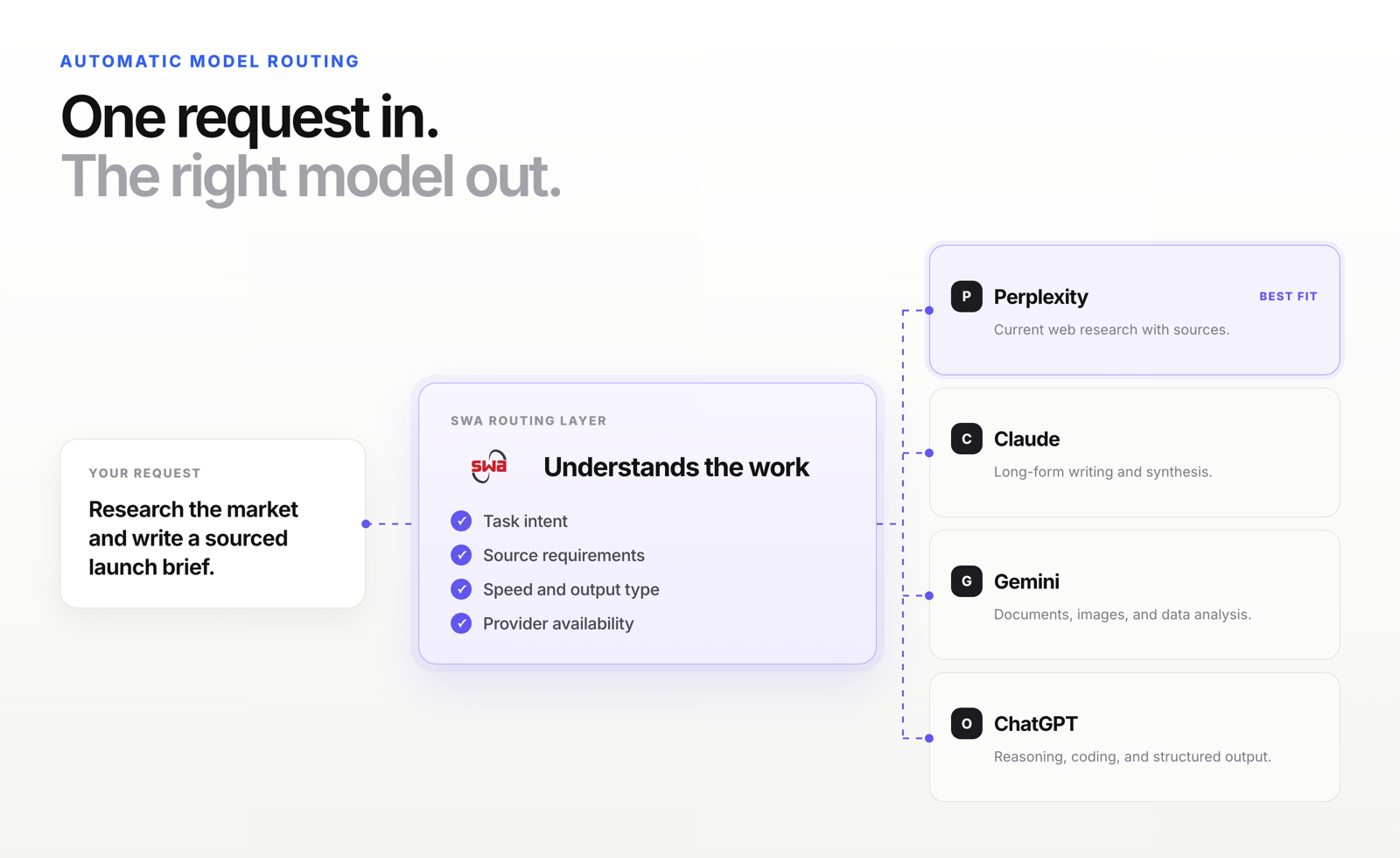
    • Swa’s intelligent routing reads your query, identifies the task type, and sends it to the model best suited to respond. You do not have to choose. Swa knows which one to use.
    • By 2028, IDC projects that 70% of top AI-driven enterprises will use intelligent model routing. The teams already doing it are pulling ahead now.
    • The hidden time tax is not the work itself. It is the 8 to 15 minutes per task spent deciding which model to use, switching tools, re-pasting context, and validating the result.
    • Code goes to DeepSeek. Research goes to Perplexity. Writing goes to ChatGPT. Analysis goes to Claude. Swa makes these calls automatically.

    Scenario 1

    Every morning your team opens a tab.

    They have a task. They look at the tab. They wonder: is this the right tool for this?

    They try that tool. The answer comes back okay, good enough. They move on.

    Scenario 2

    Your team opens a new tab to try a different model. Re-paste their context. Compare two answers. Pick one. Move on. Besides time-consuming, your company’s data has now trained two models.

    That decision, made dozens of times a day, is costing your team more time than the AI is saving.

    Thankfully, there is a fix; intelligent routing. Unfortunately, most teams have never used it.

    The finding everyone missed in OpenAI’s 2025 research

    OpenAI published enterprise AI research in 2025. Most coverage focused on the headline productivity numbers.

    But there was a finding buried in the data that almost no one talked about.

    Workers who save 10+ hours per week use multiple models. OpenAI State of Enterprise AI, 2025: time savings correlate directly with multi-model use, not with the quality of a single model. The biggest gains come from workers using several models across a wider range of tasks.

    Read that carefully. The 10-plus-hours-per-week group was not using a better version of ChatGPT; they were not on a more expensive plan. They were using multiple models, across more tools, on a broader range of tasks.

    The teams saving the most time figured out something the single-model users have not: the right model for the task matters more than the best model overall.

    The problem is that figuring out the right model for each task, every time, adds friction and costs valuable time. It creates the very overhead teams are trying to avoid.

    Swa’s intelligent routing removes friction by autonomously reading tasks and making routing decisions.

    How much time does your team actually lose?

    The honest answer is: more than anyone has tracked.

    BetterUp Labs and Stanford research from September 2025 found that 41% of workers have encountered AI-generated output they had to redo. Each instance costs nearly two hours of rework. They named it “workslop”.

    That rework is partly a model-selection problem. The wrong model for the task type produces output that sounds fine but does not hold up. The team reworks it. No one traces it back to issues with the original tool choice.

    Figure What it measures Source
    41% of workers have reworked AI output that failed quality standards BetterUp Labs + Stanford, 2025
    ~2 hrs rework time per AI failure instance, on average BetterUp Labs + Stanford, 2025
    10+ hrs saved per week by workers using multiple models vs single-model users OpenAI State of Enterprise AI, 2025
    70% of top AI enterprises will use intelligent model routing by 2028 IDC FutureScape 2026

    Here is where it gets specific. These are some of the hidden time costs most teams have never measured:

    Task Without routing With Swa routing Time saved
    Deciding which model to use before starting a task 5 to 15 min 0 sec (Swa decides) 5 to 15 min per task
    Opening the tool, logging in, navigating to the right feature 1 to 3 min 0 sec (works in Slack) 1 to 3 min per task
    Re-pasting context after switching between tools 2 to 5 min 0 sec (one command) 2 to 5 min per task
    Validating output and comparing across two tools manually 10 to 20 min All models respond in one thread 10 to 20 min per task
    Reworking output that used the wrong model for the task type Up to 2 hrs Right model from the start Up to 2 hrs per instance

    On a team running five to ten AI-assisted tasks per day, the friction cost alone adds up to two to three hours per person per day.

    That is before counting the rework from wrong-model choices.

    The paradox hiding in plain sight. 56% of CEOs reported zero measurable ROI from AI in the past 12 months (PwC Global CEO Survey, January 2026). McKinsey estimates that only 6% of companies capture outsized AI value. Those 6% have one thing in common: they redesign workflows end-to-end instead of bolting AI onto existing manual habits. Intelligent routing is the workflow redesign. It removes the manual decision that is creating overhead without adding value.

    What intelligent routing does, exactly

    Swa’s intelligent routing reads every query before it sends it anywhere.

    It identifies the task type from the language of the query. Then Swa routes it to the model built for that task. The whole process happens in under a second. You never see it. You just get the right answer faster.

    Here is what Swa’s routing looks like in practice:

    Task type Swa routes to Why that model wins here
    Code review or debugging DeepSeek DeepSeek is purpose-built for technical accuracy and bug identification. It catches syntax errors and logic issues faster than general models.
    Market research or fact-finding Perplexity Perplexity searches the web in real time and returns cited sources. No training data gaps. No hallucinated statistics.
    Long-form writing or copywriting ChatGPT ChatGPT produces fluent, tone-matched prose. It adapts to brand voice and structures content for human readers.
    Document analysis or deep reasoning Claude Claude handles long documents, nuanced reasoning, and multi-step analysis better than any general model. Ideal for strategy and compliance work.
    Current events or competitive intel Grok Grok has real-time access to X platform data and excels at surfacing contrarian perspectives and breaking information.
    Customer support responses Claude Claude’s careful, policy-aligned tone reduces escalation risk and handles sensitive interactions with appropriate nuance.
    Image or video generation GPT-Image or Sora / Gemini Task type identifies creative generation. Swa routes to the right generative model based on format.
    Brainstorming or ideation ChatGPT or Grok For open-ended creative problems, ChatGPT generates volume and Grok pushes unexpected angles. Swa uses context to decide.

    You do not configure any of this. You do not maintain it. Swa handles the routing layer so your team handles the work.

    The science behind why this works

    Intelligent routing is not a new idea. It is borrowed from one of the most proven principles in AI architecture.

    The largest, most capable AI models in the world are already built this way.

    IDC’s 2025 research noted something most teams do not know: providers of state-of-the-art models deliver them as Mixture of Experts systems. That means collections of task-specialized smaller models, hidden behind a single interface, where each prompt is routed to the specialized model that fits best.

    GPT-4o is a Mixture of Experts model. So is Mixtral. So is Gemini 1.5.

    The most advanced AI labs in the world use routing internally because specialization beats general capability on specific tasks. Every time.

    What this means for your team. When you use a single model for everything, you are using the equivalent of one generalist for every job. When Swa routes your queries intelligently, you are using the right specialist for each task. The specialist wins on accuracy, speed, and reliability. That is not an opinion. It is how the best AI systems in the world are already built.

    IDC’s 2026 AI and Automation FutureScape makes the trajectory clear: by 2028, 70% of top AI-driven enterprises will use advanced multi-tool architectures to dynamically manage model routing. The teams doing this today are not early adopters chasing a trend. They are operating the way everyone else will operate in two years.

    Three ways teams use Swa’s routing right now

    The morning brief

    A sales team starts every day by asking @swa for a briefing. One message triggers Perplexity to pull overnight news on key accounts, Grok to surface any relevant market shifts, and Claude to synthesize the findings into a short brief posted to their Slack channel.

    Without routing, this would require three separate tools, three separate logins, and twenty minutes of manual work. With Swa, it runs automatically before anyone is at their desk.

    The code review pipeline

    An engineering team added @swa to their pull request process. Every pull request (PR) gets a query. DeepSeek reviews for syntax and logic errors. Claude checks for security edge cases. The combined review posts to the PR thread before a human reviewer opens the file.

    The routing layer decides which model sees which part of the query based on task type. No one configures it for each PR. Swa handles it.

    The content draft

    A marketing manager types: “@swa write a LinkedIn post about our new integration with Salesforce.” The query hits the routing layer. Swa identifies it as a short-form creative writing task. ChatGPT gets the job.

    The manager did not choose ChatGPT. She did not think about whether Claude would be better. She did not open a second tab to compare. She typed one sentence and got a finished draft.

    That is 10 to 15 minutes back. Per task. Every day.

    What the research on single-model inefficiency shows

    METR published a randomized controlled trial in July 2025 on developer productivity with AI. The finding caught the industry off guard.

    Experienced developers using early-2025 AI tools took 19% longer on tasks than developers working without AI. The developers themselves predicted they would be 20 to 24% faster. They were measurably slower.

    The research team noted several contributing factors. But one stands out for this discussion: developers using Cursor Pro and Claude 3.5/3.7 as their primary tools were using capable models that were not always the right model for the specific task at hand.

    The friction of working around a model’s limitations, adjusting prompts to compensate, validating uncertain outputs, and switching when it did not work added overhead that erased the productivity gain.

    The teams saving 10-plus hours per week are not fighting their tools. The right model is already handling the task before friction can build.

    How much time does your team waste deciding which AI to use?

    That is the question. And it has a real number attached to it.

    If your team runs 10 AI-assisted tasks per day and spends an average of 8 minutes per task on model selection, tool switching, and context re-entry, that is 80 minutes per person per day. For a 20-person team, that is 27 hours of overhead every single day.

    Intelligent routing removes that overhead at the source.

    Swa’s routing layer makes the model selection in under a second. You use your workspace to query Swa and it automatically directs you to the right model. You read the response. You move on.

    See intelligent routing in action

    Swa routes queries to many top LLMs; ChatGPT, Claude, Perplexity, Grok, DeepSeek, Gemini, and more. No configuration. No maintenance. No tab switching.

    • Works in your workspace, including your personal device with the Swa Solo app on Apple or Android devices
    • Routing happens automatically based on your query type
    • You can override and choose any model at any time
    • Flat-rate pricing
    • No per-user fees. The whole team gets access.
    • Zero-retention architecture. Your data is never stored or trained on.

    The teams saving 10 or more hours per week are not doing anything exotic. They stopped choosing which model to use. Swa makes that call for them.

    Visit swa-ai.com to see intelligent routing in action. No credit card required. Setup in three minutes.

    The Swa Team

  • Take Care of What You’ve Got

    Take Care of What You’ve Got

    A sixth-generation Oregonian’s case for using AI wisely, and why good stewardship and good business are the same move.

    My family has been in the Northwest for six generations. We came out on the Oregon Trail and homesteaded in Douglas County, in the southern part of the state. One of my relatives served as mayor of a small Oregon town, back when the hardest fights in local government were about water rights, who got how much of a river that did not care about anyone’s plans for it.

    You learn something growing up in a family like that. Not a political something. A practical one. You take care of what you have got. The soil, the water, the equipment, the people next to you. Not because the world is ending, but because these things are finite and it is foolish to waste them. You leave the place a little better than you found it, because someday it belongs to your kids, and their kids after that.

    I have spent my career a long way from that farm, running large technical systems and now building an AI company. But that ethic never left me, and lately it keeps showing up in the one place I did not expect it: our power bill.

    The intelligence we are racing to deploy runs on my river

    Here is something most people do not think about when they use AI. It runs on real, physical things. Electricity. Cooling. Water. And a lot of it runs right here, in my backyard. The data centers along the Columbia River are powered in no small part by the same hydro and Gorge wind my family has lived alongside for a hundred and fifty years. The intelligence the whole world is racing to deploy runs, in part, on my river.

    I am not here to tell you the sky is falling. I will be honest, I am skeptical of a lot of the doom framing around this. But I do not need a catastrophe to know a simple thing: when a resource is finite, wasting it is not clever. Using it wisely is.

    And here is the part that surprised me. In AI, using the resource wisely is not a sacrifice. It is the smart business move too.

    Most companies are burning premium compute on ordinary work

    The dirty secret of enterprise AI right now is how much of it is waste. Teams point their most powerful, most expensive models at every task, from drafting a summary to reformatting a list, the same way you would fire up a diesel generator to charge a phone. It works. It also costs a fortune and runs slower than it needs to, and most of that horsepower is spent on work a smaller, right-sized model would have handled just as well.

    That is not being cutting-edge. That is leaving the truck idling in the driveway.

    The wiser approach is the one any good steward would recognize. Match the tool to the job. Use the powerful model when the work actually calls for it, and a lean, efficient one when it does not. You get the same result, for a fraction of the cost, and usually faster.

    This is why we built Swa the way we did

    Swa gives your team every major AI model in one place, and it is built to make the efficient choice the easy one. Efficient models run as the sensible default. Your admins can set the guardrails. And you can see exactly where the spend is going, instead of finding out at the end of the month.

    We do not just preach this. We run on it. Over one ninety-day stretch, our own team of twenty-six people ran more than a hundred million tokens of real work through Swa. About seventy percent of that work ran on efficient, right-sized models. The result was roughly half the compute cost of an all-premium approach, for the same output. Same work, done well, at half the bill.

    Good for your bottom line, good for the world we share

    This is the part I love, because it does not require anyone to choose. Lower AI costs go straight to your bottom line. They free up budget to put AI where it actually makes you more competitive, instead of burning it on busywork. Efficiency does not mean using less AI. It means being able to afford more of it, in the places that matter.

    And that same wise use is easier on the finite things underneath it all. The power, the water, the backyard we are handing to the next generation. You do not have to believe the world is ending to see that this is just common sense. It is good for your business, good for your people, and good for the world we all share. Those are not in tension. They are the same move.

    Take care of what you have got. It turns out to be good advice for a farm, for a river, and for how you run AI.

    Ben Pickett, Co-Founder and COO of Swa

  • Claude Tag vs Swa: Why Single-Model AI Is the Wrong Architecture for Most Companies

    Claude Tag vs Swa: Why Single-Model AI Is the Wrong Architecture for Most Companies

    This week, Anthropic shipped Claude Tag. Claude as a teammate in Slack, complete with persistent memory, permissions, an audit log, and the ability to be @-mentioned in any channel. The build is sharp. The strategic question underneath it is sharper.

    Here’s the most telling number from the launch. Anthropic disclosed that 65% of their product team’s code is now created by their internal version of Claude Tag. They also run internal support and data insight channels through the same system. In other words, Anthropic isn’t guessing at a use case. They’re productizing their own workflow, and the majority of their own engineering output already flows through the tool they just put in customers’ hands.

    That part is genuinely impressive. The architectural question that comes next is where the rest of this article spends most of its time.

    Because as good as Claude Tag is, it makes a set of architectural choices that look small on launch day and compound dramatically over a renewal cycle. Three of those choices, in particular, are worth thinking hard about before you commit your company’s operating memory to any AI vendor.

    What Claude Tag actually is

    Claude Tag is Anthropic’s most aggressive product launch yet. It runs on Claude Opus 4.8, the model Anthropic released less than a month ago, and replaces the existing Claude in Slack app for Claude Enterprise and Team customers.

    The product works like this. An administrator pairs Claude Tag with a Slack workspace, grants it access to specific tools and data sources, sets spending limits, and defines which channels it can operate in. From there, any team member in those channels can tag @Claude with a request. Write a pull request. Pull sales numbers. Run a data analysis. Claude breaks the task into stages, executes them using the tools it has access to, and responds in a Slack thread with the result.

    Four capabilities differentiate Claude Tag from earlier AI integrations:

    • Multiplayer. One Claude per channel, not a separate instance per user. Anyone can see what it’s working on. Anyone can pick up where the last person left off.
    • Learns over time. As Claude follows along in a channel, it accumulates context about the work happening there. You don’t re-explain projects from scratch.
    • Takes initiative. With ambient mode enabled, Claude surfaces relevant information across the channels it monitors and follows up on threads that have gone quiet.
    • Works asynchronously. Claude pursues projects autonomously over hours or days, not just within a single chat session.

    The most respected voice in AI on launch day was Andrej Karpathy, the former Director of AI at Tesla and OpenAI founding member. His read: “It’s not some LLM Q&A with RAG over Slack. It’s a different way of working entirely, for people and teams. I work from Slack now.”

    He’s not wrong. The architectural pattern Claude Tag introduces, the shift Karpathy called “everyone is a manager,” is real. The era of AI as a tool is ending. The era of AI as a teammate is beginning.

    We agree with that read. In fact, we’ve been building Swa around exactly that pattern for two years.

    Where we diverge from Anthropic’s implementation is on three architectural choices: which models the teammate runs on, where the teammate can be reached, and who owns the memory layer underneath. Those choices are the entire subject of the rest of this article.

    Where Claude Tag is genuinely strong

    Before getting into where Swa is different, it’s worth being clear about what Claude Tag does well. There are real scenarios where Claude Tag is the right product.

    If your company is already standardized on Claude across every team and use case, Claude Tag gives you the tightest possible integration. No translation layer between providers. No model-routing decisions to manage. No edge cases between APIs. Just one model, deeply integrated, with the polish of two years of Anthropic’s internal experimentation.

    The single billing relationship matters too. One contract with Anthropic, one usage dashboard, one set of admin controls. Procurement loves this. So does finance, at least until the bill arrives.

    And the enterprise security work is serious. System administrators can define separate Claude identities scoped to specific channels with specific tools. Token-spend limits at the organizational and channel level. A complete audit log of every action Claude has taken and which user requested each task. For organizations managing compliance or regulatory requirements, that’s table stakes, and Anthropic shipped it on day one.

    The product is good. Karpathy’s defense holds. This is not a hackathon project.

    For everyone else, the architectural choices we made building Swa solve problems Claude Tag is built to leave to its users.

    Where Swa is built differently

    We took the opposite architectural bet across three dimensions. Here’s what each one means in practice.

    Model neutrality: 10+ models, one interface

    Different tasks call for different models. A research question is best handled by Perplexity. A code review usually runs better with Claude or ChatGPT. A creative brainstorm often benefits from Gemini’s broader range. An image generation request needs ChatGPT Images 2.0, Nano Banana Pro, or Midjourney. A voice synthesis task needs ElevenLabs or its peers.

    Claude Tag handles all of these by routing to Anthropic’s stack and falling back to tool use when a request falls outside Claude’s native skills. That works, but it means configuring a new tool integration per capability gap. It also means every model behind the scenes is still mediated by Claude, with Claude’s pricing, Claude’s rate limits, and Claude’s uptime.

    With Swa, your team gets access to 10+ AI models from a single @swa mention. ChatGPT, Claude, Gemini, Perplexity, Grok, Deepseek, Llama, and more. Our intelligent routing automatically picks the best model for each query. However, your team can also specify which model to use when they prefer. As a result, there’s no more switching between AI tools, no more configuring tools per capability, and no more single-vendor dependency for capabilities outside one lab’s strengths.

    There’s a second benefit worth naming. The frontier moves every month. New models ship, old models get cheaper, leaders change quarterly. With a single-model setup, you adopt the new frontier at the pace your vendor decides. With Swa, you adopt it the day it’s available.

    Platform neutrality: every surface, one bill

    Claude Tag launched on Slack. That’s a strong opening surface, especially given how Slack-heavy Anthropic itself is. Anthropic has been a public Slack customer story, with the company reportedly saving $4.5 million using Slack internally and running an internal @claudeai channel for company knowledge. They built Claude Tag where they spend most of their own work day.

    But most companies don’t only work in Slack.

    Your sales team lives in WhatsApp. Your engineering team lives in Slack. Your operations team lives in Microsoft Teams. Your field team checks SMS. Your customer support team uses a web dashboard. Work happens across all of those surfaces, often within the same hour.

    Swa runs natively on Slack, Microsoft Teams, WhatsApp, SMS, and the web, all on one billing account. When a user moves from desk to phone to Teams call to back to Slack, the AI follows. The context goes with them. There is no separate per-platform contract or per-platform AI to manage.

    Anthropic has said they plan to expand Claude Tag beyond Slack eventually. That expansion will happen on Anthropic’s timeline. Your team’s cross-platform work doesn’t wait.

    Context portability: your memory, your rules

    This is the part most companies underweight on day one. It also matters most at renewal time, at incident time, and at acquisition time.

    Inside Swa, the memory of how your company works lives in your workspace under your control. The documents your team has uploaded. The agents you’ve built. The prompts that work. The integrations you’ve wired up. The audit logs of who asked what. All of it is inspectable, permissioned, exportable, and model-neutral.

    If you decide to swap providers underneath, your memory comes with you. If you want to spin up a new agent that uses Perplexity for research and Claude for writing, you do it in plain language and it’s available across every surface your team uses. If your security team asks for a download of every prompt run in Q2, you export it in a click.

    Claude Tag stores its memory inside Anthropic’s product surface. It’s accessible to you while you’re a customer. The question of what happens to your accumulated operating memory if you ever leave isn’t one we’d want to test in production.

    The architectural principle is simple. Models should be interchangeable. The intelligence layer should be rotatable. Your company’s accumulated context should not be.

    Side-by-side: how the two products compare

    Capability Claude Tag Swa
    Models supported Claude (Anthropic) ChatGPT, Claude, Gemini, Perplexity, Grok, Deepseek, Llama, and 4+ more
    Image generation Via tool use configuration Native routing to ChatGPT Images 2.0, Nano Banana Pro, and others
    Voice and audio Via tool use configuration Native routing
    Platform availability Slack (Teams and others planned) Slack, Microsoft Teams, WhatsApp, SMS, Web
    Single-vendor outage risk Full dependency on Anthropic uptime Multi-provider failover
    Pricing model Token-based, single vendor Token-based, flat-rate, single pooled bill
    Per-user fees None announced None. Add users without changing your bill.
    Memory portability Lives inside Anthropic’s product surface Exportable, inspectable, model-neutral
    Custom agents Through Claude’s tool use framework Build any agent in plain language, available everywhere
    Multi-workspace billing One contract per Slack workspace One billing account across every tenant

    The differences look small on day one. They compound dramatically over a renewal cycle.

    Three questions to ask before committing

    Before you commit your company’s operating memory to any AI vendor, here are the three questions every team should be able to answer.

    1. What happens when the model you’re locked into has an outage?

    Anthropic has had multi-hour outages this year. Every model provider has. If your Slack agents going dark for four hours mid-quarter is unacceptable, single-vendor agents are the wrong architecture. Multi-provider routing isn’t a luxury at enterprise scale. It’s the difference between a productivity tool and a single point of failure.

    2. What happens when a better model ships?

    The frontier moves every month. New models, new benchmarks, new pricing tiers. If you’re three quarters into a Claude Tag deployment when a meaningfully better model launches from a different lab, you can’t simply route to it. You’re committed to Anthropic’s adoption pace, not the market’s.

    3. What happens when you need to leave?

    Vendor lock-in for software is annoying. Vendor lock-in for your company’s operating memory is something else entirely. If you can’t export every prompt, every audit log, every custom agent definition, every user permission, on demand, you don’t own your context. The vendor does.

    Anthropic isn’t the villain here. The incentives are obvious. They have every commercial reason to keep your operating memory inside their product surface. The architectural choice is yours, and it’s the one decision that’s hardest to undo later.

    What teams are doing with Swa

    The same multi-model, multi-platform approach that makes Swa different from Claude Tag also makes it useful across more roles. A short look at how teams are putting it to work:

    • Sales teams use Swa for CRM updates from WhatsApp, competitive research on the road via SMS, and proposal drafting in Slack. One AI, every surface they sell on.
    • Engineering teams rely on Swa for code reviews with Claude, incident response with the model best suited to fast reasoning, and documentation generation routed to whichever model is fastest that hour.
    • Marketing teams use Swa for content creation, campaign analysis, image generation via Nano Banana Pro for social cards, and SEO research via Perplexity. All from the same @swa mention.
    • Support teams handle ticket resolution, knowledge base queries, and sentiment analysis across Slack, Teams, and SMS.
    • Legal and compliance teams run contract review, compliance checking, and risk assessment with full audit logs that export to CSV in one click.
    • Operations and IT teams consolidate AI spend, govern model access, and run their own audits without depending on any single vendor’s transparency.

    The pattern across every role is the same. The work happens where the team already works. The model fits the task. The memory stays under the company’s control.

    When Claude Tag is the right call

    We started this article by saying there are scenarios where Claude Tag is the right product, and we meant it. The conditions where Claude Tag wins:

    • Your company is 100% standardized on Claude across every team and use case.
    • Your team works exclusively in Slack with no plans to add Teams, WhatsApp, or SMS surfaces.
    • You don’t need capability breadth outside Claude’s native skills (image generation, voice synthesis, niche analysis types).
    • You’re willing to accept single-vendor uptime risk in exchange for tighter integration.
    • You have no near-term need to export your AI operating memory to another provider.

    If all five of those conditions apply to your company, Claude Tag is a sharper product. We’d recommend trying it before evaluating Swa.

    When Swa is the right call

    For most companies we talk to, the answer is the opposite. The conditions where Swa is the better architectural fit:

    • You want to use the best model per task, not be limited to one lab’s lineup.
    • Your team works across multiple surfaces (Slack, Teams, WhatsApp, SMS, web), and you want the AI to follow them.
    • You need capability breadth (image generation, voice synthesis, niche analysis) without configuring a new tool integration for each one.
    • Uptime matters. You want multi-provider failover, not single-vendor exposure.
    • You want your operating memory to be portable, inspectable, and model-neutral by design.
    • You want a single billing account that doesn’t punish you for adoption.

    Most enterprise stacks meet at least four of those criteria. That’s why we built Swa.

    What’s next

    Claude Tag is a meaningful launch. It validates a thesis we’ve been writing about for two years: AI belongs as a teammate inside the tools your team already uses, not as a separate tab. The argument that AI should be @-mentioned in Slack is over.

    The argument that’s just starting is which architecture wins. We think Karpathy’s “everyone is a manager” framing is the right read of where work is going. We think the manager works best when they can route any task to any model on any surface. And we think the companies that win the next five years of enterprise AI will be the ones that didn’t couple their operating memory to one lab’s roadmap.

    If you want to see what that looks like, the fastest path is to try it. Swa sets up in three minutes across Slack, Teams, WhatsApp, SMS, and the web. No credit card required. Or if you’d prefer a walkthrough of the multi-model and multi-platform architecture, our team is happy to talk.

    The intelligence rotates. The memory stays yours.

    The Swa Team

  • The AI Hallucination Problem: When GenAI Gets a Little Too Creative

    The AI Hallucination Problem: When GenAI Gets a Little Too Creative

    That’s why we built Swa — to make AI answers smarter, safer, and verifiable, without slowing you down.

    Imagine you’re having a conversation with a super smart, yet slightly eccentric friend who’s had one too many cups of coffee. They’re rattling off facts left and right, but every now and then, they throw in a completely made-up detail — like insisting that penguins can fly if you just believe hard enough. Welcome to the world of AI hallucinations, where chatbots and language models can get a little too creative with the truth, blending facts with fiction in ways that might leave you chuckling… or checking your sources twice.


    What Are Hallucinations?

    Hallucinations happen when a language model presents incorrect information as fact, often with the kind of unwavering confidence that makes it sound utterly believable. It’s not that the AI is trying to deceive you — it’s more like it’s piecing together patterns from its vast training data and sometimes connecting the dots in the wrong way.

    This can be sneaky because the model often gets most of the response right, lulling you into a false sense of security. Picture a small business owner using AI to brainstorm marketing copy: the tool nails the tone and key points, but slips in a made-up customer testimonial or an inaccurate industry stat. We’ve heard anecdotes about lawyers who relied on AI tools to draft depositions, only to find out later that some cited references were pure invention!


    The Challenge of Accuracy

    Spotting these slip-ups isn’t always easy, especially when the AI responds with such poise. And when you do catch an error? The model might cheerfully admit it with something like, “You’re right, good catch!” or “Oops, my bad.” It’s almost endearing — like a puppy that just chewed your shoe but wags its tail anyway.

    But let’s be real: that’s cold comfort if you’re making business decisions based on that info, whether it’s pricing strategies, customer advice, or compliance details. The real issue is the potential ripple effects, from minor mix-ups that waste time to bigger headaches that could affect your reputation or bottom line.


    How Swa Can Help

    That’s where Swa steps in as your trusty sidekick, turning potential pitfalls into opportunities for smarter AI use. Unlike relying on a single model, Swa lets you cross-check outputs from various language models effortlessly. Got a response that feels off? Just ask the same question across multiple models at once — Swa handles the heavy lifting, comparing answers and highlighting inconsistencies.

    For small business owners juggling a million tasks without a dedicated research team, this is a game-changer. Imagine you’re prepping a sales pitch and the AI suggests a market trend that sounds too good to be true. With Swa, you can verify it against models like Grok, Claude, or Perplexity in seconds, spotting any hallucinations before they bite.

    Remember Google’s Bard chatbot? During its launch, it confidently bungled a fact about the James Webb Space Telescope taking the “first” images of an exoplanet (spoiler: it wasn’t the first). These slip-ups highlight why cross-verification is key!


    How to Spot BS Like a Pro

    Here’s how to protect yourself (and your business) from hallucinated hype:

    • Ask for receipts. Prompt models to cite sources. Even if they don’t get it right, the attempt often signals how confidently the model is guessing.
    • Break it down. Complex, multi-part queries are where hallucinations thrive. Split your requests into smaller chunks and validate each one.
    • Double-check the “obvious.” AI loves confidently misstating common facts (like laws, timelines, even math). If it feels too polished or just a little too perfect — check it.
    • Use model comparison. Swa lets you fire the same question to multiple models at once. If Claude and ChatGPT mostly agree but Grok goes rogue, you’ll spot the outlier.
    • Assume tone ≠ truth. Confidence doesn’t equal accuracy. Hallucinations often show up wrapped in perfect tone and structure — that’s why they slip past you.
    • Use Swa’s multi-model feature for anything mission-critical.

    Conclusion

    Hallucinations may seem like a quirky side effect of AI’s creativity, but they can lead to real-world hiccups if left unchecked. With Swa by your side, you can navigate these complexities with ease and a smile! By leveraging multiple models for verification, you enhance your decision-making, minimize risks, and make the most of what AI has to offer.

    So next time you’re chatting with a language model, remember: just because they sound like a know-it-all doesn’t mean they’re always spot-on. A little diligence (and a tool like Swa) goes a long way in keeping things factual and fun!


    Spot the Fake: Can You Tell Which One is the Hallucination?

    Language models can sometimes generate responses that are so convincing, it’s hard to tell what’s real and what’s not. Let’s play a game: we’ll give you three statements, two of which are completely made up, and one that’s true. Can you spot the fake?

    Statement 1: The city of Paris has a law that requires all buildings to have a minimum of 10% green space on their rooftops.

    Statement 2: The popular social media platform, Instagram, was originally designed as a platform for sharing recipes and cooking tips.

    Statement 3: The European Union has a directive that requires all new cars to be equipped with automatic emergency braking systems by 2025.

    Answers:

    • Statement 1 is FALSE. While Paris does have initiatives to increase green spaces, there is no law requiring a minimum of 10% green space on rooftops.
    • Statement 2 is FALSE. Instagram was originally designed as a platform for sharing photos, not recipes or cooking tips.
    • Statement 3 is TRUE. The European Union does have a directive that requires all new cars to be equipped with automatic emergency braking systems by 2025.

    How did you do? It’s not always easy to spot the fake, especially when language models can generate such convincing responses. That’s why it’s so important to verify information, especially when it comes to critical decisions or high-stakes applications. With Swa, you can cross-check responses across multiple models to get a more accurate answer. Give it a try and see how it can help you spot the fake!


    Guess what? I didn’t use ChatGPT, or Claude, or Grok to write this. I used all of them — with Swa. That said, these are my words, my sentiment, and my promises. Human-in-the-loop AI — that’s what Swa is about. We’re not replacing people. We’re empowering you to do more, better, and faster, without losing your voice in the process.

    — Mike Sirchuk, Founder of Swa

  • From Chaos to Clarity: How Swa Supercharges Small Businesses with AI

    From Chaos to Clarity: How Swa Supercharges Small Businesses with AI

    Picture this: You’re running a small coffee shop, juggling inventory, marketing, and that one employee who’s always “innovating” by turning the espresso machine into a Rube Goldberg contraption. Sound familiar? After decades in the trenches of big corporations—where confusion, overwork, and “why are we doing this?” questions run rampant—I’ve seen how these issues trickle down to small teams too. But here’s the good news: You don’t need a massive budget or a tech degree to fix it. Enter Swa, your all-in-one AI sidekick designed to cut the bloat and boost your business.


    Why AI? Because Even Experts Need Help

    We all hit roadblocks—whether it’s brainstorming marketing ideas or deciphering HR policies. AI can be that on-demand expert, knowing everything from legal tweaks to creative campaigns. But let’s be real: Raw AI can sometimes spit out nonsense (I’ve seen it suggest pineapple on pizza as a business strategy—yikes). Used right, though? It’s a game-changer, saving hours and sparking “wow” moments. Swa makes sure you get the wow without the weird.


    Democratizing AI: Power for Your Whole Team

    Forget elite access for just the boss. Swa brings top-tier AI to everyone in your business—all at once (yes, like that movie, but with less multiverse madness and more productivity). No per-user fees, no sharing your secret recipes or company data. We built this platform to empower teams securely, skipping the creepy tracking or data training. Your info stays yours, period.


    How Swa Works: Simple, Seamless, and Smart

    Swa isn’t just about convenience—it’s about smart orchestration. One model might be great at summarizing HR docs, another shines at creative copy. With Swa, you’re not locked into a single AI brain. If ChatGPT gives you fluff, tell Swa to grab Claude for clarity or Grok for punch. You’re not stuck rerolling the dice—you’re choosing the right tool for the job.

    Don’t trust the first answer? Neither do we. Swa can cross-check answers across models so you’re not making decisions off a one-off hallucination. It’s built to give you better outcomes, not just faster ones.

    Never heard of Grok or DeepSeek? Doesn’t matter. Swa knows which models are best at what and routes requests to the one most likely to nail it. You don’t need to know the tech—you just need the right answer.

    Swa plugs into tools you already love—Slack, Teams, SMS, WhatsApp—turning them into portals for your custom AI hub. Pick a base model (we recommend affordable gems like Llama or DeepSeek, or let us choose), and you’re off to the races. Need more firepower? Just say “Swa, ask Grok“, Claude, ChatGPT, or whatever suits the task. Generate images for your menu? Done. Videos for social media? Easy. And yes, you can block that overzealous accountant from making AI cat memes while unleashing your marketing team to create viral gold.

    • Control at Your Fingertips: Manage who accesses what—no rogue AI experiments on company time.
    • Your Data, Enriched: Upload your website summaries, HR policies, product details, or expense rules. Swa weaves this context into queries behind the scenes, turning basic questions into tailored gems. Ask about PTO? Get an answer customized to your rules, without us hoarding your data.
    • Pay as You Go: Access premium models via a simple token system—no contracts, no commitments.

    Imagine: Your barista asks Swa for inventory tips, enriched with your shop’s sales data, and gets a spot-on plan. Or your marketer generates ad copy that’s not just good—it’s your brand voice. All without multi-year deals or privacy nightmares.


    The Future? Even Brighter with Swa

    We’re not stopping here. Craving an AI legal whiz? Finance guru? Marketing maestro? Swa integrates the best providers, so you tap elite expertise on demand. It’s like having a dream team of specialists in one app, paying only for what you use.

    In a world where small businesses fight to stay afloat, Swa helps you swim faster—and have fun doing it. Ready to ditch the bloat and embrace the boom? Try Swa today and see how AI can transform your world.

    What’s your biggest challenge? Let’s chat!


    Guess what? I didn’t use ChatGPT, or Claude, or Grok to write this. I used all of them—with Swa! That said, these are my words, my sentiment, and my promises. Human-in-the-loop AI—that’s what Swa is about. We’re not replacing people. We’re empowering you to do more, better, and faster, without losing your voice in the process.

    — Mike Sirchuk, Founder of Swa

  • Google Search vs. LLM: When to Use Each Tool

    Google Search vs. LLM: When to Use Each Tool

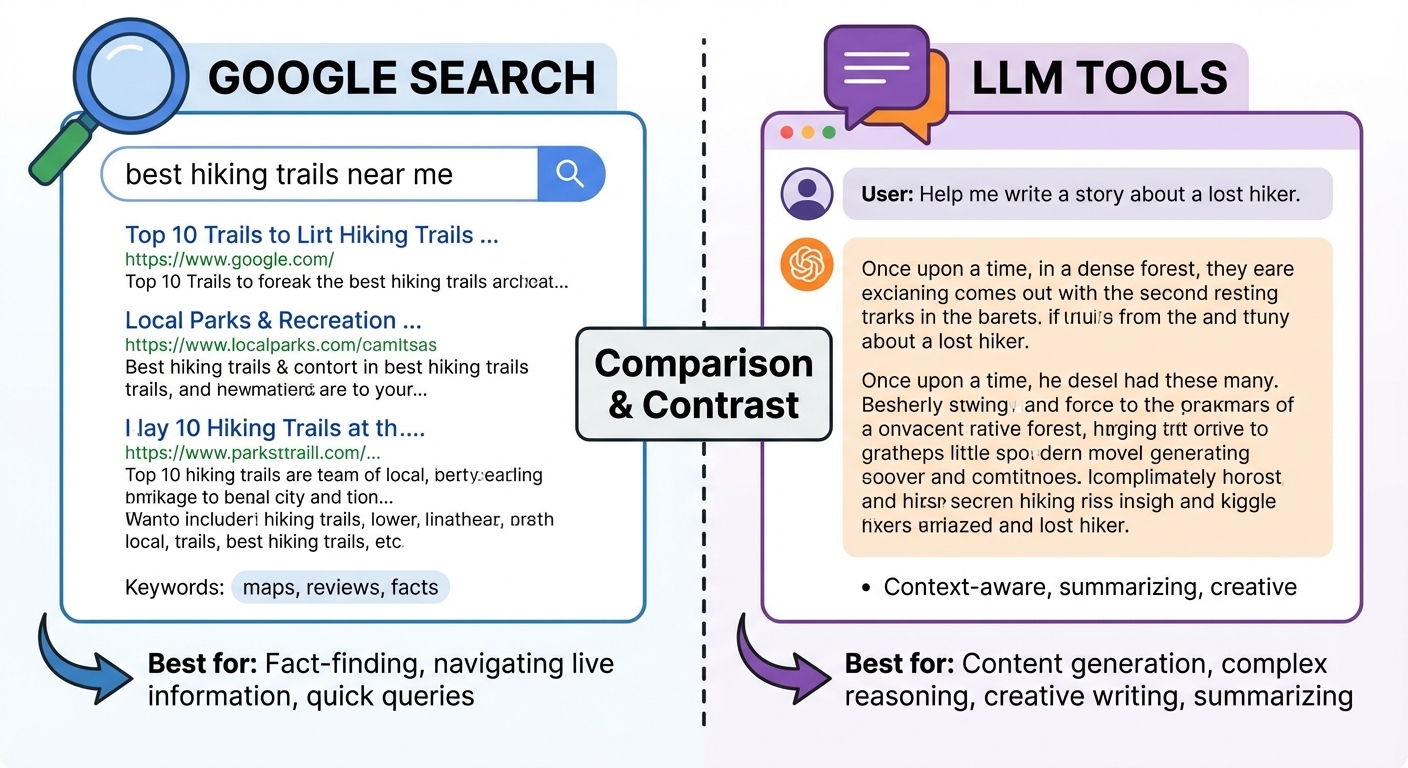
    You probably use Google every day. But have you tried using an LLM like ChatGPT, Perplexity, or Grok for research? If not, you might be missing a powerful option.


    Search Engines Excel at Quick Answers

    Google and other search engines are fantastic for straightforward queries. Need to know today’s weather, your kid’s school calendar, or the date and location of an upcoming industry conference? A search engine gets you there fast.

    Search engines also work well when you need in-depth information from a few trusted websites. You might search, skim a couple of reputable results, and find your answer without extra effort. There’s minimal synthesis required—you’re retrieving specific information from known sources.

    For simple questions, this approach is efficient. Learning how to treat a fever? One or two medical websites will likely have what you need, and reading more won’t add much actionable value.


    LLMs Shine for Complex Research

    Sometimes, though, research demands more. Imagine you’re trying to understand a rare disease diagnosis and treatment options. Or your house foundation needs work, and you need to understand the problem before calling a contractor. At work, a new competitor enters your market, and you need to understand their positioning and potential impact on your business.

    These scenarios require checking multiple sources and synthesizing the information into a coherent understanding. Traditional search means opening many tabs, taking notes, maybe creating a document to track your progress. You might discover related topics and open more tabs to explore them later.

    LLMs change this equation. They’re built to synthesize information across multiple sources and adapt as you refine your questions. Instead of you juggling tabs and notes, the LLM handles the heavy lifting.


    How LLMs Work (And Their Limitations)

    LLMs generate responses based on patterns learned from their training data rather than searching the web in real-time. However, LLMs typically start with fewer resources per query to conserve computational power, meaning you may need to ask follow-up questions to get complete answers.

    This isn’t a weakness; it’s a feature of the interaction model. You need to engage with the LLM: clarify your questions, ask related follow-ups, and push back if results don’t match your needs. Sometimes rephrasing a question differently will unlock the answer you’re seeking.

    Don’t be afraid to tell an LLM that its response missed the mark. This isn’t a sign the tool is broken—it’s feedback that your phrasing and the LLM’s interpretation didn’t align. LLMs can be stubborn in how they interpret requests, so clearly articulate what you wanted and why the answer fell short.


    The Hallucination Problem (And How to Fix It)

    You’ve likely heard that LLMs sometimes “hallucinate”—providing confident-sounding but inaccurate information. This happens because LLMs are programmed to provide answers, even when uncertain. That’s why it’s critical to push back on information you receive and ask for sources.

    The best practice? Ask multiple LLMs the same question. Compare their responses, verify claims, and use disagreements as a signal to dig deeper. This approach—pitting LLMs against each other—helps you catch errors and build more accurate, well-rounded research.


    Swa Makes Multi-LLM Research Seamless

    This is where Swa changes the game. Instead of logging into multiple platforms and manually comparing responses, Swa lets you access multiple LLMs in one place.

    Here’s how it works:

    1. Ask your question to ChatGPT and refine the interaction until you have a solid response.
    2. Ask Perplexity to evaluate what ChatGPT provided and add refinements based on your earlier questions.
    3. Ask another LLM to synthesize all responses into one cohesive answer—no repetition, just clarity.

    With Swa in Slack, you do all this in one conversation. Answers from different LLMs appear in the same thread, eliminating the need to hop between apps and manually compare results. You spend less time managing tools and more time analyzing what the LLMs uncovered to identify gaps or additional research needed.

    Even when you’re an expert on a topic, Swa can serve as a knowledgeable editor—helping you spot advancements you’ve missed or verify that your knowledge is still current.


    The Bottom Line

    Search engines excel at straightforward, specific queries where you need quick answers from known sources. LLMs offer an evolving, conversational research tool that can tackle intricate, multifaceted problems by adapting to your needs mid-research.

    The combination of both—search for quick facts, LLMs for complex synthesis—brings efficiency to your research process. You spend less time gathering information and more time analyzing and applying what you learn. That matters, whether you’re solving problems at work or at home.


    Ready to experience multi-LLM research without the friction? Try Swa free and see how multiple perspectives streamline your research.

    Guess what? I didn’t use ChatGPT, or Claude, or Grok to write this. I used all of them with Swa! That said, these are my words, my sentiment, and my promises. Human-in-the-loop AI, that is what Swa is about. Empowering everyone to do more, and better, in less time.

    – Mike Sirchuk, Founder of Swa

  • AI for the Rest of Us: Why Businesses Should Give Tokens a Shot

    AI for the Rest of Us: Why Businesses Should Give Tokens a Shot

    (And Why AI Isn’t as Dumb as It Seems)

    Ever Feel Like AI Is Just a Fancy Toy for Big Corporations?

    Picture this: You’re a small business owner juggling a million tasks, and you’ve tried asking an AI a simple question online – only to get a response that’s about as useful as a chocolate teapot. “Stupid answers,” right? We’ve all been there. AI hype promises the world, but for many, it feels like an overhyped Google search that (more than) occasionally hallucinates.

    But here’s the kicker: 70% of small businesses say AI costs too much or is too confusing to bother with (yep, that’s from real surveys like those from the Small Business Administration). If you’re nodding along, thinking, “Why should I spend money on this when it can’t even tell me the weather without going off on a tangent?” – stick around. I’m about to demystify how a shared “token” system can make AI actually work for you, without the BS.

    The Real Problem: AI’s Not Built for the Little Guy

    Let’s be honest – AI can be a bit of a diva. It gives brilliant insights one minute and total nonsense the next (looking at you, viral AI fails). But the bigger issue for small businesses isn’t the tech itself; it’s the barriers:

    • Sky-High Costs: Per-user pricing from big providers means you’re paying full freight even if half your team uses it once a month. It’s like buying a gym membership for everyone, only to watch it gather dust.
    • Limited Options: Stuck with one AI model? That’s like having a toolbox with just a hammer – great for nails, useless for screws.
    • Tech Overwhelm: Jargon and setup that make you feel like you need a PhD just to get started.

    This leaves small businesses on the sidelines while big corps lap up the benefits. Enter tokens: the great equalizer.

    Tokens: Your AI Fuel, Shared and Sensible

    Tokens aren’t some sci-fi currency – they’re just how we measure AI’s brainpower. Think of them as gas for your car’s engine: input tokens are what you feed the AI (your questions), and output tokens are what it spits back (the answers). Simple, right?

    The magic happens when you share them. Instead of everyone getting their own pricey account, your whole team dips into one pool. It’s like a family data plan for your phone – everyone benefits without multiplying bills.

    And unlike those big providers who lock you into their single, overpriced model (cough, like being forced to eat at one restaurant forever), tokens let you access multiple AIs. Need a creative boost for marketing? Pick a word wizard. Crunching numbers? Grab a data cruncher. All without extra fees.

    At Swa, we’re committed to keeping costs low. We buy tokens in bulk from our providers and even self-host when we can, passing those savings directly to our customers. I’m not just saying this because it sounds good – I’m the founder, and Swa is a savvy small business too, funded by 401(k)s, not venture capital booms of Silicon Valley. So when I say we’re here to help you save, I mean it!


    Why Bother with AI? Real Wins for Your Business (No Hype, Promise)

    Okay, so tokens sound neat, but what’s the point if AI feels like a gimmick? Fair question. The value isn’t in one-off queries – it’s in transforming how you work, bit by bit. Here’s the no-nonsense payoff, with examples tailored to small biz life:

    • Save Time on Tedious Stuff: Automate the grunt work. Lets say you run a local bakery. You can use AI to generate quick social media posts and inventory forecasts, slashing admin time from hours to minutes. Result? More time baking (and selling) those killer scones.
    • Smarter Decisions with Insights: AI digs through data you already have, spotting patterns humans might miss. AI can analyze customer calls to predict peak seasons – helping to staff up and avoid losing jobs. Boom: 15% more revenue without guessing.
    • Happier Customers, Less Stress: Chatbots handle basic queries 24/7, like answering “Do you deliver?” for your online store. No more midnight emails, and customers love the instant help. It’s like having an extra employee who doesn’t need coffee breaks (though AI might “hallucinate” if you don’t guide it right – hence the multiple models!).
    • Actual Cost Savings: Start with a predictable monthly fee for your token pool (they roll over, no expiration drama). Run out? Set a budget cap to avoid surprises. Compared to per-user plans, you could save 80% while empowering your whole team – power users get more without punishing the occasional dabblers.
    • Custom Fit for You: Not every task needs a fancy AI. Tokens let you pick budget-friendly options, so your startup isn’t paying enterprise prices for basic help.

    In short, AI isn’t about replacing you – it’s your sidekick, handling the boring bits so you can focus on what makes your business unique. And yeah, it messes up sometimes (who doesn’t?), but with multiple models, those flubs become rare, and the wins add up fast.

    Why Invest? Because Leveling Up Shouldn’t Cost a Fortune

    Spending on AI might seem risky, like betting on a politician. But think ROI: If it saves you even 5 hours a week (that’s $500+ in labor value at average small biz rates), it pays for itself. Plus, in a world where competitors are using AI to outpace you, staying analog is the real risk. Tokens democratize this – giving mom-and-pop shops the same edge as tech giants, without the giant bills.

    Ready to Test the Waters?

    Don’t take my word for it – dive in with a free token trial and see if Swa can actually make your life easier (spoiler: it can, minus the occasional goofy response). Head to swa-ai.com, install swa – no demo, just use, and turn that skepticism into “Why didn’t I do this sooner?”

    What’s one task in your business that could use an AI boost? Let’s make AI work for the little guy – because the future shouldn’t just belong to the big fish.

    Guess what? I didn’t use ChatGPT, or Claude, or Grok to write this. I used all of them with Swa! That said, these are my words, my sentiment, and my promises. Human-in-the-loop AI, that is what Swa is about. No replacing, but empowering everyone to do more, and better, in less time.

    – Mike Sirchuk, Founder of Swa

  • Introducing Swa: AI for Slack, Teams, and SMS

    Introducing Swa: AI for Slack, Teams, and SMS

    Teams want to use AI, but the tools are fragmented, expensive, and disconnected from where work actually happens. Every new AI tool means another login, another tab, another per-user subscription. As a result, the costs and complexity add up fast when you multiply that across a team of 50 or 500.

    That’s exactly why we built Swa.

    What is Swa?

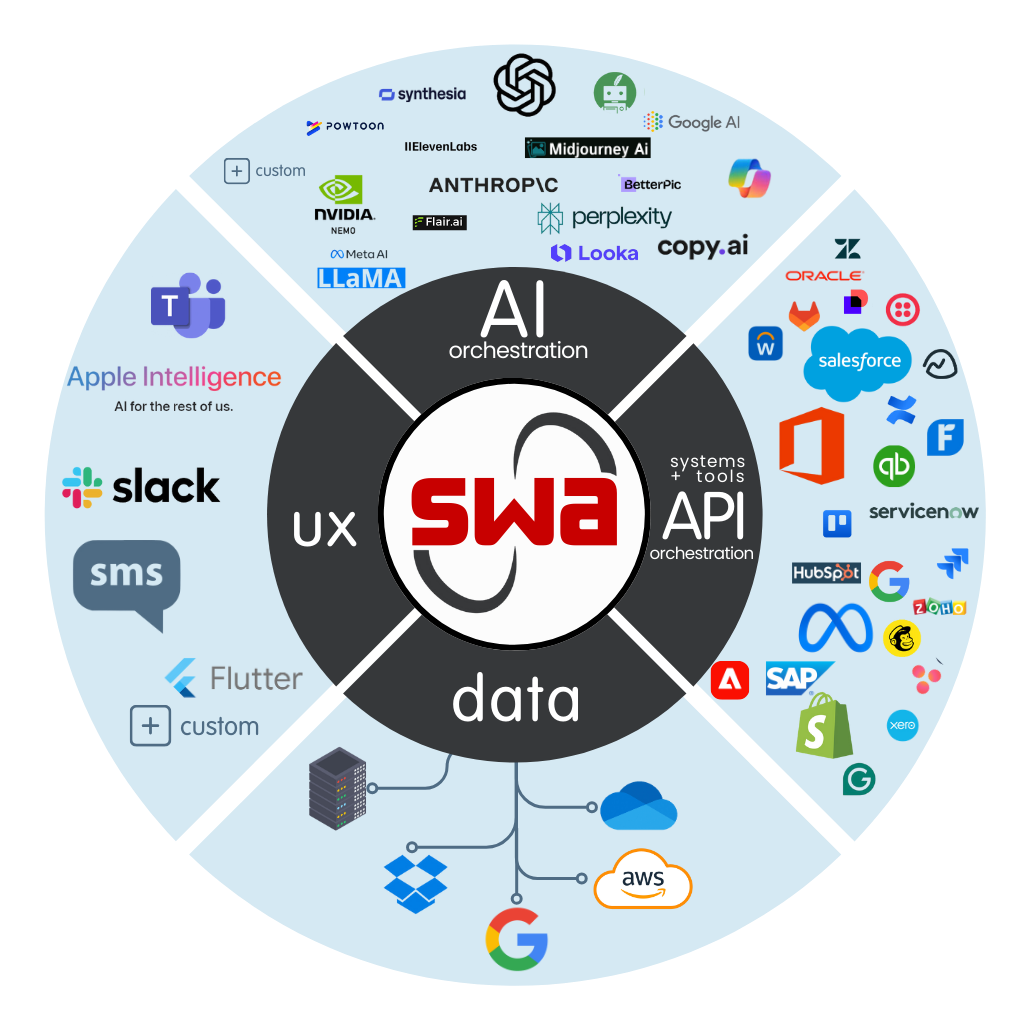
    Swa is a multi-model AI platform that works inside the collaboration tools your team already uses. Simply type @swa in Slack, Microsoft Teams, or send a text message to get instant access to 10+ AI models. These include ChatGPT, Claude, Gemini, Perplexity, Grok, Deepseek, Llama, and more.

    In other words, there are no new apps to install, no new interfaces to learn, and no per-user fees to worry about.

    Powerful: AI that actually gets work done

    Swa isn’t just a chatbot. It’s a multi-model AI platform that connects to the tools your business already runs on. Your team can query multiple models simultaneously, compare responses side by side, and build custom agents using plain language.

    For example, need an SEO writer? A code reviewer? A compliance checker? Just describe what you want, and your agent is ready instantly. On top of that, Swa connects to Jira, GitHub, Outlook, and more, so AI doesn’t just answer questions. It takes action on behalf of your team.

    Flexible: 10+ AI models, one interface

    Different tasks call for different models. A research question might be best suited for Perplexity, while a code review works better with Claude or ChatGPT. Meanwhile, a creative brainstorm might benefit most from Gemini.

    With Swa, your team gets access to all of them from a single @swa mention. Our intelligent routing automatically selects the best model for each query. However, your team can also specify which model to use when they prefer. This means there’s no more switching between AI tools or managing separate subscriptions for each one.

    Secure: Enterprise-grade data protection

    Security isn’t a feature we bolted on after the fact. Instead, it’s the foundation of how Swa works from the ground up.

    Swa operates as a pass-through service. Your prompts are sent to the AI model, the response is delivered back to you, and then the data is purged. We don’t train on your data, we don’t retain your queries, and we don’t sell or share your information. Here’s what that looks like in practice:

    • SOC 2 aligned security practices across the platform
    • Zero-retention data handling for all queries
    • GDPR and HIPAA ready for regulated industries
    • End-to-end encryption with TLS 1.3 in transit and AES-256 at rest
    • Authentication powered by Auth0 (Okta) for enterprise-grade identity management
    • Data sovereignty options available for organizations with regional requirements

    Your security and legal teams can review the full details on our Security page.

    Cost effective: No per-user fees, ever

    Per-user pricing punishes growth. Consider this: a team of 100 paying $25/user/month for a single AI tool adds up to $2,500/month, and that’s for just one model.

    Swa takes a different approach with flat-rate, token-based pricing. Your entire team shares a token pool, so adding users doesn’t increase your bill. As a result, teams regularly save up to 90% compared to traditional per-seat AI tools.

    To see how the numbers break down for your team size, visit our Pricing page.

    Works where your team already works

    Rather than forcing your team into a new tool, Swa lives inside the platforms they use every day:

    • Slack – Full workspace integration with channels, DMs, and file processing
    • Microsoft Teams – Seamless support for team conversations, channels, and group chats
    • SMS – AI-powered answers delivered via text message, wherever you are
    • WhatsApp – AI on the go, right from your phone

    Best of all, setup takes under 3 minutes. It’s a one-click install with no coding required.

    What teams are doing with Swa

    Across industries, teams are finding new ways to put Swa to work every day:

    • Sales teams use Swa for CRM updates, competitive research, and proposal drafting
    • Engineering teams rely on it for code reviews, incident response, and documentation
    • Marketing teams leverage it for content creation, campaign analysis, and SEO optimization
    • Support teams handle ticket resolution, knowledge base queries, and sentiment analysis
    • Legal and compliance teams streamline contract review, compliance checking, and risk assessment

    What’s next

    This is just the beginning. In the coming weeks, we’ll be sharing product updates, how-to guides, and stories from teams using AI to work smarter.

    Follow along here on our News page, or get started with Swa today.

    The Swa Team